Dear Valued customer,
Please be informed that Cyberia will be migrating your Emails from current Email server platform to new platform with additional features to enhance your overall experience.
And due to internet security challenges these days; using unsecure ports will not be allowed anymore, you are kindly requested to purchase SSL certificate in order to install it in your associated domain / Web Mail.
New features for SMTP, POP3, IMAP,
- ActiveSync,
- Outlook Connector,
- CalDAV & CardDAV.
- Microsoft® Exchange ActiveSync® Connector
- Two factor authentication (Mandatory requirement to comply with the regulator).
Kindly choose the best date to carry this migration in order to guide you through the entire process. Thursday would be the preferred one.
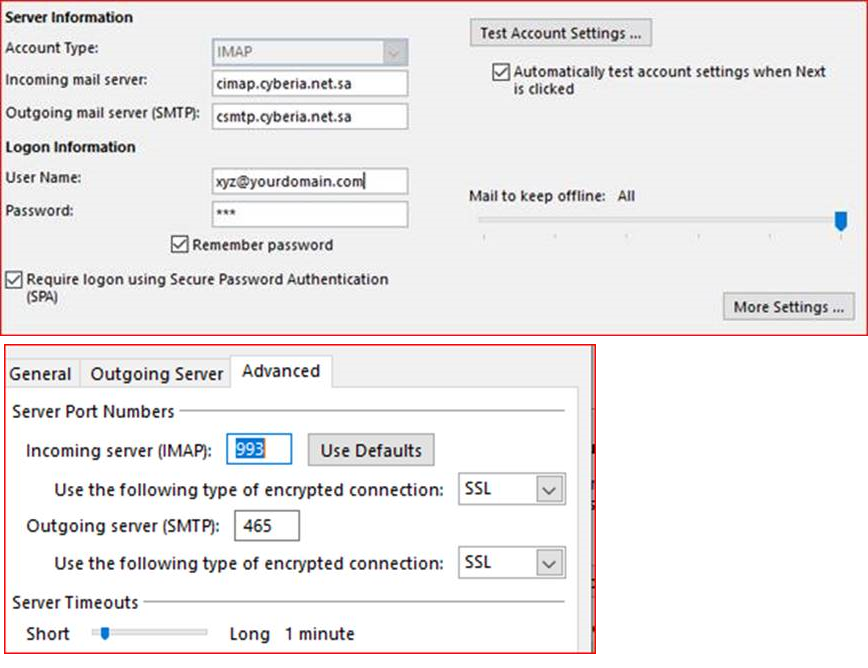
It is Automatic & transparent email migration just you need to change the settings in the outlook on the migration date as shown below.
You will keep having access to old Email server for 30 days after the migration.
- Incoming Mail server for IMAP : cimap.cyberia.net.sa
- outgoing Server: csmtp.cyberia.net.sa
=======================================
For more Information please don't hesitate to contact our call center . Duty time 24/7 : Tell 800 124 8124