Create New Emails

  1. -visit the admin control panel URL via https://webmail.cyberia.net.sa:9443/
  2. Enter the control panel credentials provided to you by Cyberia Systems Team.
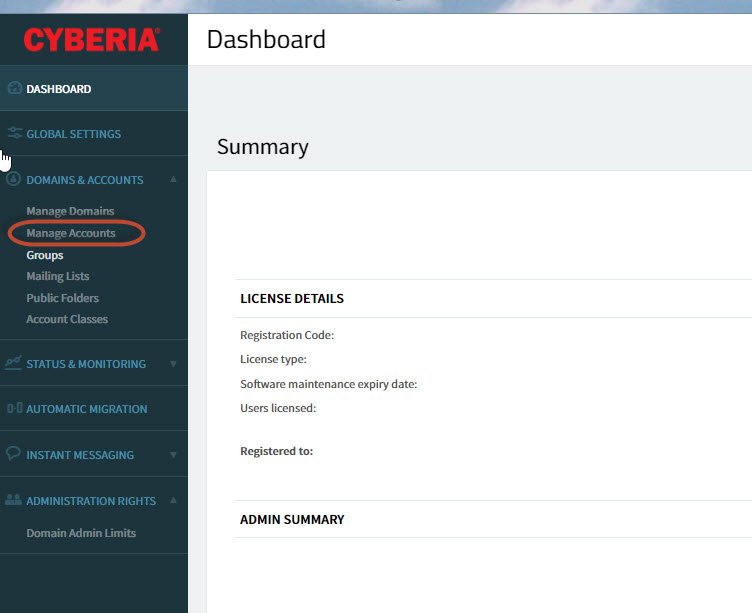
  3. after login click on Manage accounts :
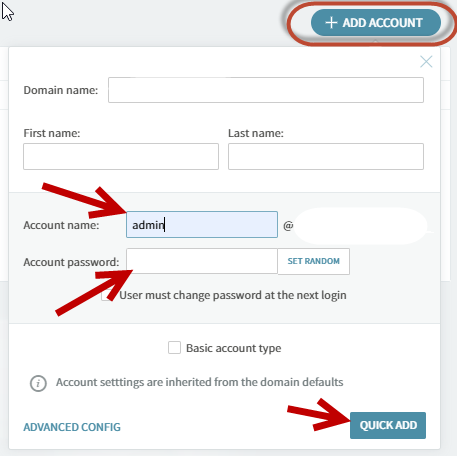
4. click on add account and fill in the required information (first name, last name, required email ID @yourcomanydomain.tld, Complex Password  ) finally click on quick Add to provision the new mailbox.
  • 1 用戶發現這個有用
這篇文章有幫助嗎?

相關文章

How to transfer your domain to Cyberia

Below is the procedure for domain transfer to Cyberia.1) The customer has to provide us with the...

How do I manually configure Outlook for my E-Mail Accounts

In Microsoft Outlook 2007, from the Tools menu, select Account Settings. On the E-mail tab,...

Outlook IMAP Configuration

Dear Valued customer,    Please be informed that Cyberia will be migrating your Emails from...

Outlook POP & IMAP Configuration

  POP3 Configuration      IMAP Configuration :    

Change or reset your password

Follow the below  steps to reset your account password  : 1- login to webmail by visiting the...