Create New Emails

  1. -visit the admin control panel URL via https://webmail.cyberia.net.sa:9443/
  2. Enter the control panel credentials provided to you by Cyberia Systems Team.
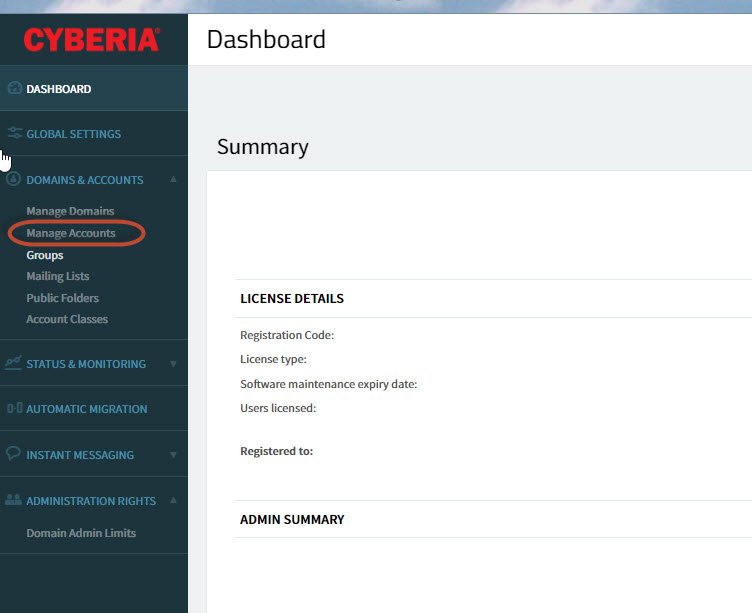
  3. after login click on Manage accounts :
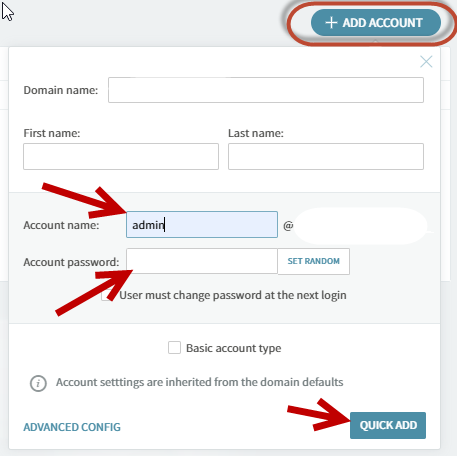
4. click on add account and fill in the required information (first name, last name, required email ID @yourcomanydomain.tld, Complex Password  ) finally click on quick Add to provision the new mailbox.
  • 1 användare blev hjälpta av detta svar
Hjälpte svaret dig?

Relaterade artiklar

How to transfer your domain to Cyberia

Below is the procedure for domain transfer to Cyberia.1) The customer has to provide us with the...

How do I manually configure Outlook for my E-Mail Accounts

In Microsoft Outlook 2007, from the Tools menu, select Account Settings. On the E-mail tab,...

Outlook IMAP Configuration

Dear Valued customer,    Please be informed that Cyberia will be migrating your Emails from...

Outlook POP & IMAP Configuration

  POP3 Configuration      IMAP Configuration :    

Change or reset your password

Follow the below  steps to reset your account password  : 1- login to webmail by visiting the...